


The Liquid UI client resides on the user's iPad, iPhone, or iPod Touch. To enable full functionality, including the ability to display customized screens and transactions, the client communicates with the SAP ERP system through the Liquid UI Server. Client configuration is performed within the app, while server configuration files are stored on the Liquid UI Server.
Scripts that manage the customized device screens and processes can be stored in any of the following locations:
- Liquid UI Server
- Network Share
- SAP Web Repository
Liquid UI connects your handheld devices to the server wirelessly, while the connection between the Liquid UI Server and the SAP ERP system is established through a wired Ethernet connection. Both the Liquid UI Server and the SAP ERP system reside behind the customer's corporate firewall.
The architecture of Liquid UI is as follows:
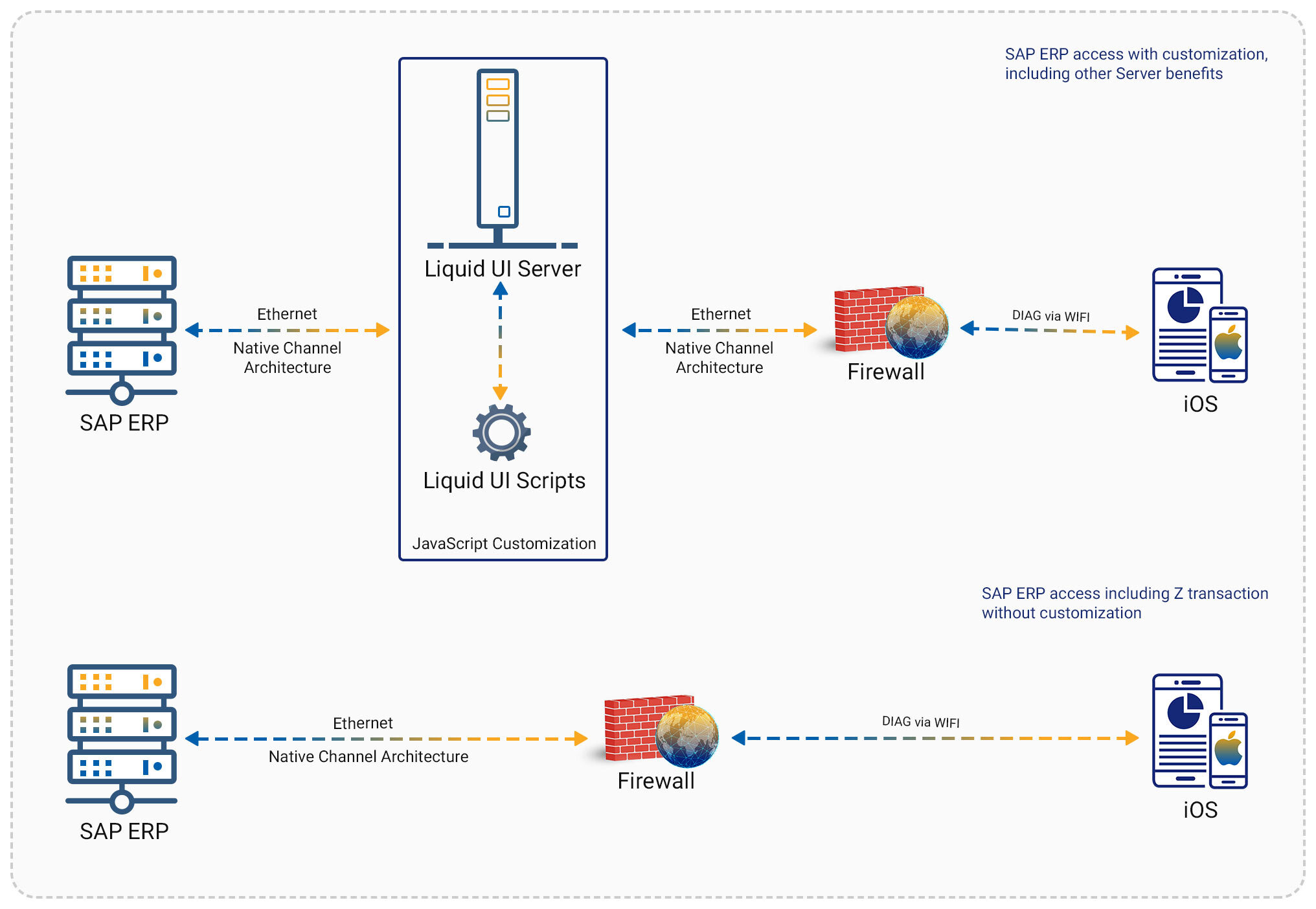

Note: The Liquid UI scripts mentioned in the architecture diagram are utilized to develop customized SAP screens. Click here for more information about Liquid UI components and how to display customized SAP screens on your iOS devices.