In addition to installing Designer, the InstallShield Wizard can also be used to repair or remove Designer once it is installed. the available options are as follows.
- Modify Designer
- Repair Designer
- Remove Designer
Modifying Designer
To modify GuiXT Designer after it is installled, please do the following.
-
Double-click on the Installer. The following screen will appear.

-
Click the Modify radiobutton as shown above.
-
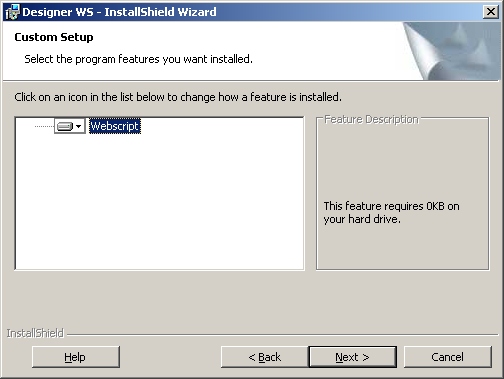
The below screen will display. Choose the 'Webscript' component and then click Next.
-
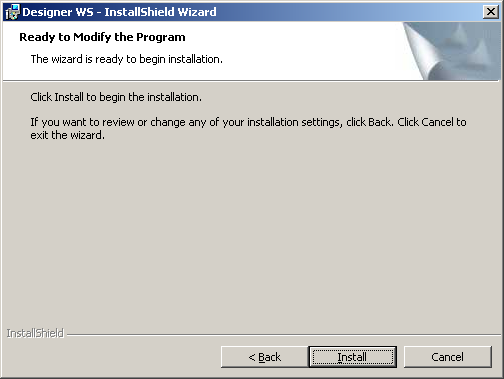
The below screen will display. Click Install to begin modifying Designer's installed components.
-
When the modification completes, the Finish screen will display. Designer's components are now modified.
Repairing Designer
Ther may be times when Designer or its components become damaged after installation. To repair GuiXT Designer after it is installled, please do the following.
-
Double-click on the Installer. The following screen will appear. Click the Repair radiobutton.

-
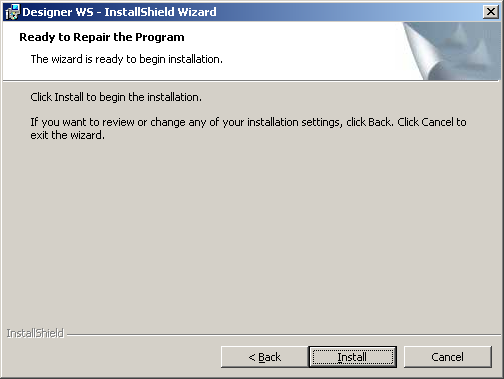
THe following screen will display. Click the Install radiobutton to begin the repair process.
-
When the repair operation is complete, the Finish screen will display. Designer's components are now repaired.
Removing Designer
To remove GuiXT Designer after it is installled, please do the following.
-
Double-click on the Installer. The following screen will appear. Click the Remove radiobutton.

-
The following screen will display. Click the Install button to begin removing DEsigner from your system.

-
When the removal operation is complete, the Finish screen will display. Designer's components are now removed.