- Go to the VA01 initial screen.
-
Open the 'SAPMV45A.E0101.sjs' script file, and enter the following code. Create the file if it does not already exist.
view([0,84],[24,131], "SAPLinks.htm");
-
Create a HTML file containing the following SAP URL links:
The file will contains the following data:
- Launch VA01
-
This link will take you to the SAP Create Sales Order screen and will input the 'OR' value into the Order Type field. It will then execute an Enter command to proceed to the ensuing screen. The code is shown below:
<a href="SAP://OrderType:OR">Launch VA01</a><br>
- Launch MM01
-
This link will take you to the MM01 transaction. No values will be input into any fields. The code is shown below:
<a href="SAP://OK:/nMM01">Launch MM01</a><br>
- Launch IW21 - 1
-
This link will take you to the MM01 transaction. No values will be input into any fields. The code is shown below:
<a href="SAP://OK:/nIW21, process=executeIw21">Launch IW21 - 1</a><br><br>
The function that is called is not stored in the HTML file, but rather in the transaction script file. This function is as follows:
function executeIw21( ) { onscreen 'SAPLIQ50.0100' set("F[Notification type]", "M1"); enter( ); } - Launch IW21 - 2
-
This link will launch the IW21 transdaction adn tehn subsequently luanch the IW32 transaction. The code is as follows:
<a href="SAP://OK:/nIW21">Launch IW 21 - 2</a><br><br>
- Launch IW21 - 3
-
This link launches the IW21 trasnaction, calls the 'executeIw21' function introduced in Example 3 above and then stops and launches the IW32 transaction. The code is shown below:
<a href="SAP://OK:/nIW21, process=executeIw21">Launch IW21 - 3</a><br><br>
- Launch VA01 (image)
-
Click this image to launch the VA01 transaction and input the value 'OR' into the Order Type field. The code is as follows:
 <a href="SAP://OK:/nmm01">
<img src="mm01.gif" alt="Launch MM01" width="60" height="20"><BR>
</a>
- Launch MM01 (image)
-
Click this image to launch the MM01 transaction. No data will be input into any fields. The code is shown below:
 <a href="SAP://OK:/nmm01">
<img src="mm01.gif" alt="Launch MM01" width="60" height="20"><BR>
</a>
- Launch IW21 (image)
-
Click this image to launch the IW21 transaction and call the 'executeIw21' function introduyced earlier. The code is as follows:
 <a href="SAP://OK:/nmm01">
<img src="mm01.gif" alt="Launch MM01" width="60" height="20"><BR>
</a>
- Launch VA01 (pushbutton)
-
Click this pushbutton to launch the VA01 trawnsaction and call a function named 'launchVA01'. The code is shown below:
<form> <input type="button" value="Launch VA01 " onclick="launchva01()" /><br> </form> function launchva01() { window.location = "SAP://OrderType:OR;OK"; } - Launch MM01 (pushbutton)
-
Click this pushbutton to launch the MM01 trawnsaction and call a function named 'launchMM01'. The code is as follows:
<form> <input type="button" value="Launch MM01 " onclick="launchmm01()" /><br> </form> function launchmm01() { window.location = "SAP://OK:/nMM01"; } - Launch IW21 (pushbutton)
-
Click this pushbutton to call a function that will launch the IW21 transaction. The code is shown below:
 <form>
<input type="button"  value="Launch IW21 " onclick="launchiw21()" /><br>
</form>

function launchiw21()
{
  window.location = "SAP://OK:/niw21";
}
-
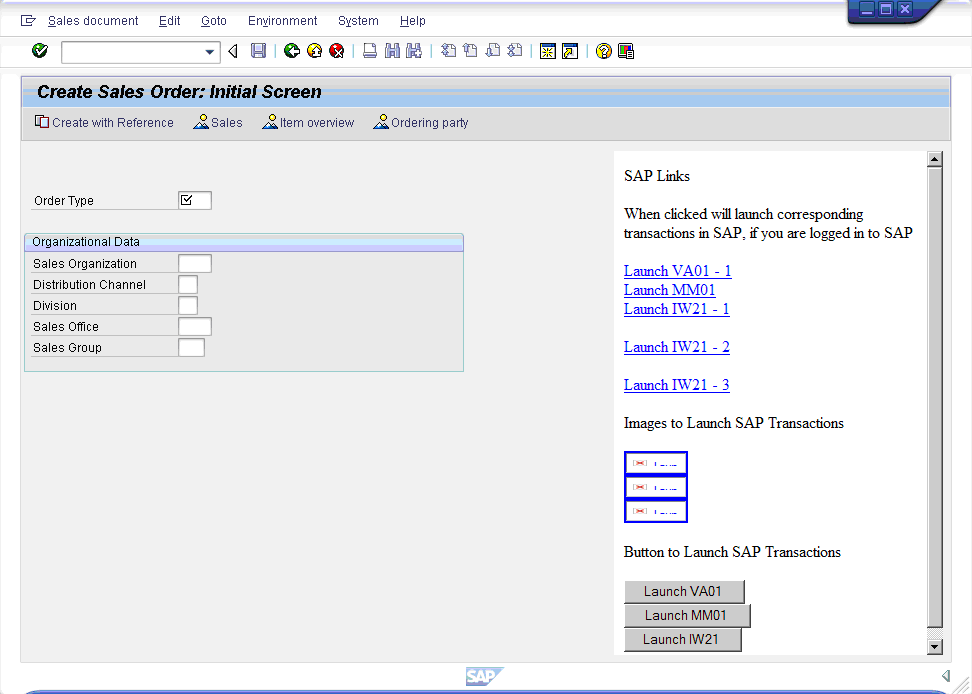
Save the changes and refresh the SAP screen. It will now display as shown below: