The 'toUTF8' command is used to encode text returned by a call command into UTF-8. If you are working in a non-English environment, you may need to convert the data returned by a call command into a readable format. However, when we call a function module using a call command, and the result strings have special characters, WS does not automatically encode the text, resulting in unreadable data being displayed. To correctly display these special characters, you will need to use the 'toUTF8' command. The syntax is as follows.
toUTF8(STRING);
The 'STRING' value is the is the sub string that contains the characters that are being incorrectly displayed.
Options
The 'toutf8' command does not take any options.
Example
To demonstrate the 'toUTF8' method, please do the following.
-
Open the script file for the SAP Easy Access screen and enter the following code.
clearscreen(); var arMatDesc = ["ICP*RFC*"]; arF4MatList = []; call("BAPI_MATERIAL_GETLIST",{"table.MATERIALSHORTDESCSEL":"arMatDesc","table.MATNRLIST":"arF4MatList"}); println('----arF4MatList='+arF4MatList); for(var ii=0; ii<arF4MatList.length; ii++){ text([ii,0],arF4MatList[ii].substring(18,58),{"name":"z_test"+ii,"size":50}); } -
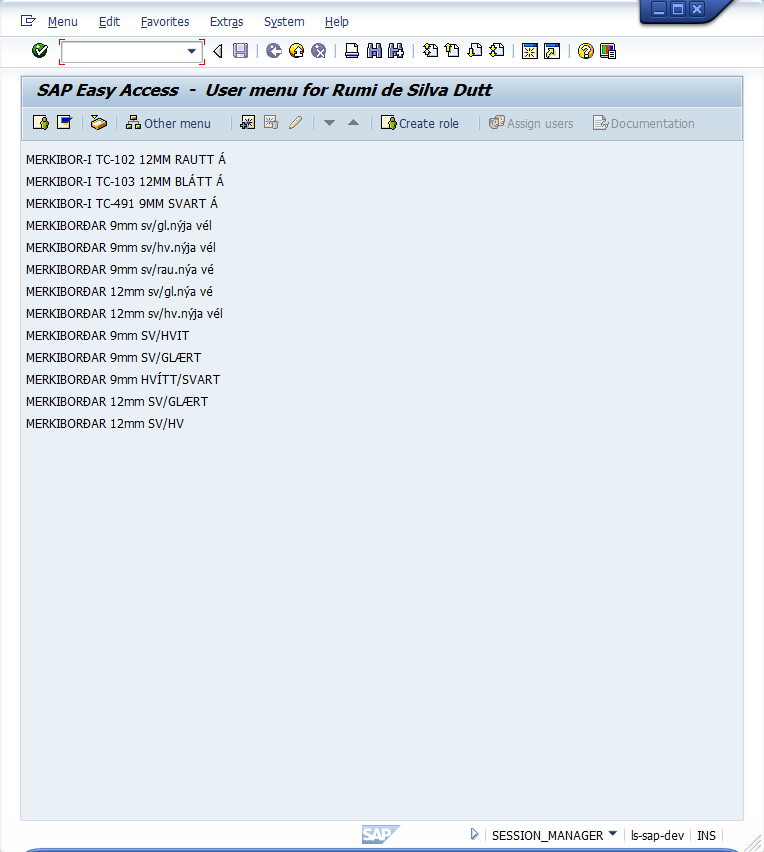
Run your script and verify that some data returned will display as unreadable characters, as shown in the example below.

-
To correct this problem, you will use the 'toUTF8' command in your script. Once you get the array from the function module call, each array element needs to be converted in to UTF8. After that, we can get the substrings. The revised code is as follows.
clearscreen(); var arMatDesc = ["ICP*RFC*"]; arF4MatList = []; call("BAPI_MATERIAL_GETLIST",{"table.MATERIALSHORTDESCSEL":"arMatDesc","table.MATNRLIST":"arF4MatList"}); println('----arF4MatList='+arF4MatList); for(var ii=0; ii<arF4MatList.length; ii++){ var convertedString = toUTF8(arF4MatList[ii]); text([ii,0],convertedString.substring(18,58),{"name":"z_test"+ii,"size":50}); } -
The characters that initially displayed in an unreadable format are now displayed correctly as shown below: