The readfile command is used to read the content from files.
Once you open an external file using the openfile command, you can use the readfile command to read a record into a variable in the WS environment. The following file type is supported:
- .csv
The syntax is as follows:
readfile("filename");
Options
The readfile command does not take any options.
Example
To demonstrate the readfile command, please do the following:
-
Open the script file for the IW21 transaction and enter the following code:
function isBlank(jvar){ return(jvar == null || jvar == "" || jvar == void(0)); } for(a=firstChild; a!=null; a=a.nextSibling){ a.del(); } pidx = 0; idx=0; text([0,0], "Material" , {"size":20}); text([0,22], "Item" , {"size":20}); text([0,44], "Description" , {"size":20}); create:{ inputfield([pidx + 1,0], {"size":20, "readonly":true, "name":"z_first_&V[pidx]" ,"nolabel":true}); inputfield([pidx + 1,22], {"size":20, "readonly":true, "name":"z_second_&V[pidx]" ,"nolabel":true}); inputfield([pidx + 1,44], {"size":20, "readonly":true, "name":"z_third_&V[pidx]" ,"nolabel":true}); } set("V[z_checkfld]", "&V[z_first_&V[pidx]]"); if(isBlank(z_checkfld)) { println("<<<<<<<<<CHECK FIELD>>>>>>>>>>" + z_checkfld); goto end_create; } pidx = pidx + 1; goto create; end_create: onUIEvents['Enter'] = {"process":iw21_readfile, "fcode":"/niw21"}; function iw21_readfile(){ println("<<<<<<<<<<<<INITIAL VALUE>>>>>>>> :" + idx); openfile('file2.csv', {"delimiter":","}); read:{ println("<<<<<<<<<<<<READING VALUES>>>>>>>> :" ); readfile('file2.csv', {"z_first_&V[idx]":true, "z_second_&V[idx]":true, "z_third_&V[idx]":true}); } set("V[z_currField]" , "&V[z_first_&V[idx]]"); println("<<<<<<<<<<<<<<<<<Current Field>>>>>>>>>>>>>>" + z_currField); if(isBlank(z_currField)) { println("<<<<<<<<<<<<<<GOING END>>>>>>>>>>>>>>"); goto end; } idx++; println("<<<<<<<<<<<<THE IDX VALUE>>>>>>>> :" + idx); goto read; end: closefile('file2.csv'); } -
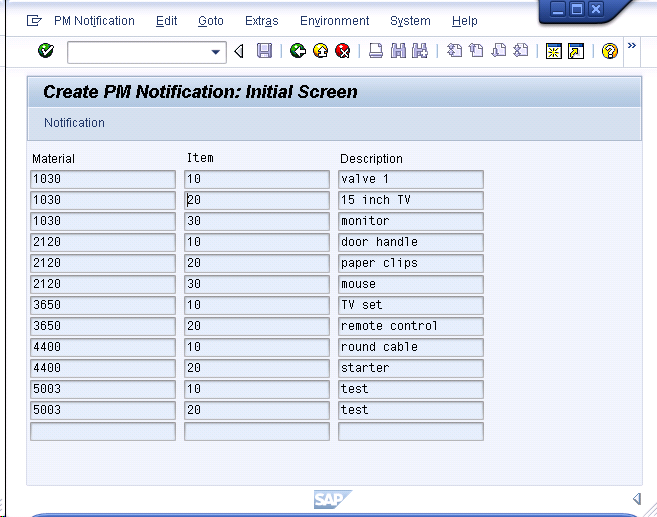
Create a file named 'file2.csv'. This file will contain the following data:
					1030,10,valve 1
1030,20,15 inch TV
1030,30,monitor
2120,10,door handle
2120,20,paper clips
2120,30,mouse
3650,10,TV set
3650,20,remote control
4400,10,round cable
4400,20,starter
5003,10,test
5003,20,test
-
Save the changes and refresh the SAP screen. The IW21 screen will now appear as follows: